Dwi Wahyudi
Senior Software Engineer (Ruby, Golang, Java)
In this article, we’re going to kickstart our e-commerce app with Go.
Kickstarting Our Application
In previous article, we’ve listed some API to build in order for this app to run. We’re going to start with registration API. We need to store account’s information in database. But before that, let’s pay attention on some foundational code first.
But before that, let’s create a new app. We’re going to download some libraries:
- chi-router for routing.
- github.com/BurntSushi/toml for reading toml config file.
- github.com/jackc/pgx/v4 for PostgreSQL driver.
- github.com/jmoiron/sqlx for SQL extension.
$ mkdir go-mini-commerce
$ cd go-mini-commerce
$ go1.18 mod init go-mini-commerce
$ go1.18 get -u github.com/go-chi/chi/v5
$ go1.18 get -u github.com/jackc/pgx/v4
$ go1.18 get -u github.com/BurntSushi/toml@latest
$ go1.18 get -u github.com/jmoiron/sqlx
We’re going to use sqlx for extending standard sql package, it can support pgx driver too. The interface would still be the same with some nice features and extension both provided by sqlx and pgx.
Directory Structure
And here’s how our starting directory structure will look like.
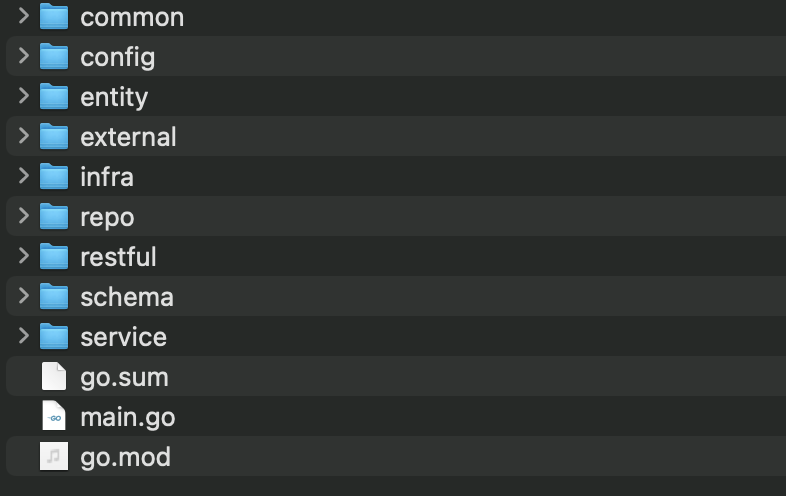
commoncontains common codes used by multiple layers of our app.configcontains secrets and configs.entitycontainsstruct,var,constused by multiple layers of our app.externalcontains external dependency other than core database. We decouple this part for future isolation use.infracontains Go code to connect with infrastructure (PostgreSQL, ElasticSearch, etc).infrawill composeexternalcomponents.repocontains Go code to communicate with our datasource, for now we’ll be using PostgreSQL for our core.restfulcontains http handlers for restful communications.schemacontains database migration files.servicecontains Go service code.
Directory structure or layout is debatable matter. It is always better to give a directory a name that screams its intention. Hopefully those directories above can scream their respective intention to whoever who see it.
For starting out, here’s our first server using chi router, this is our main.go. Don’t forget the chi router import to include v5.
package main

import (
	"net/http"

	"github.com/go-chi/chi/v5"
)

func main() {
	var (
		r = chi.NewRouter()
	)

	r.Get("/ping", func(w http.ResponseWriter, r *http.Request) {
		w.Write([]byte("pong"))
	})
	http.ListenAndServe(":4545", r)
}
Let’s run this server:
$ go1.18 run main.go
We can then test the /ping route:
$ curl localhost:4545/ping
Database
Because we’re going to use PostgreSQL, we run this command to run the database:
docker run -d -rm -p 5433:5432 -e POSTGRES_PASSWORD='chocolatecake' -e POSTGRES_USER='user00' -e ALLOW_IP_RANGE=0.0.0.0/0 -e "TZ=UTC" -e "PGTZ=UTC" -e PGDATA=/var/lib/postgresql/data/pgdata -v $HOME/postgres_14_data:/var/lib/postgresql/data --name postgresql-14 postgres:14.1
Above command tells docker to get and run PostgreSQL 14 container with username user00 and password chocolatecake. We also map certain dir $HOME/postgres_14_data as volume to PostgreSQL container PGDATA env. If it’s running, we can then check the container status. We’ll be using the default port, 5432.
$ docker container ls

CONTAINER ID   IMAGE           COMMAND                  CREATED        STATUS          PORTS                    NAMES
5148f39bcc2d   postgres:14.1   "docker-entrypoint.s…"   3 months ago   Up 46 seconds   0.0.0.0:5433->5432/tcp   postgresql-14
We’re going to name our database: minicommerce.
# psql -U user00
psql (14.1 (Debian 14.1-1.pgdg110+1))
Type "help" for help.

user00=# CREATE DATABASE minicommerce;
CREATE DATABASE
user00=#
For database migration, we’re going to use this: golang-migrate.
Database Connectivity.
Before we move to our first API, we need to construct some code to connect and communicate with PostgreSQL. We’ll do this in infra package.
In order to store secrets (such as database host, username and password), we’re going to do it in a toml file. Prepare a toml file app.toml in config/ directory. Add it to .gitignore.
[pg]
write_pg_database_url="postgres://user00:chocolatecake@0.0.0.0:5433/minicommerce?sslmode=disable"
read_pg_database_url="postgres://user00:chocolatecake@0.0.0.0:5433/minicommerce?sslmode=disable"
With this toml file in place, we’re going to use this with sqlx extension and pgx driver. Here’s how infra/infra.go will look like.
package infra

import (
	"log"
	"os"
	"sync"

	"github.com/BurntSushi/toml"
	_ "github.com/jackc/pgx/v4/stdlib"
	"github.com/jmoiron/sqlx"
)

type (
	Infra interface {
		PG() DB
	}

	DB struct {
		Read, Write *sqlx.DB
	}

	PGConfig struct {
		WritePgDatabaseURL string `toml:"write_pg_database_url"`
		ReadPgDatabaseURL  string `toml:"read_pg_database_url"`
	}

	config struct {
		PGConfig PGConfig `toml:"pgconfig"`
	}

	infra struct {
		config
	}
)

func NewInfra() Infra {
	return &infra{}
}

var (
	cfgOnce sync.Once
	cfg     config
)

func (i *infra) Config() config {
	cfgOnce.Do(func() {
		cfgFile, err := os.ReadFile("config/app.toml")
		if err != nil {
			log.Fatal(err)
		}

		_, err = toml.Decode(string(cfgFile), &cfg)
		if err != nil {
			log.Fatal(err)
		}
	})

	return cfg
}

var (
	dbOnce sync.Once
	db     DB
)

func (i *infra) PG() DB {
	dbOnce.Do(func() {
		cfg := i.Config()
		writeDB, err := sqlx.Open("pgx", cfg.PGConfig.WritePgDatabaseURL)
		if err != nil {
			log.Fatal(err)
		}

		readDB, err := sqlx.Open("pgx", cfg.PGConfig.ReadPgDatabaseURL)
		if err != nil {
			log.Fatal(err)
		}

		db = DB{Read: readDB, Write: writeDB}
	})

	return db
}
Config()function will readconfig/app.tomland decode it toconfigstruct. So far this struct contains database URL for our app.Infrainterface exposesPG()method which will open (and connect with) the database, the method will returnDBstruct that hasReadandWritedatabase connections, the implementation above is usingsqlxandpgx.Infrainterface also exposesConfig()as well for our components (http handlers, services, repo, etc to use).infrastruct includingDBstruct above will be passed down to repo level for querying/executing queries statements.- Any instance of handler (restful or may be GRPC) should have
infraas one of the fields, so that we can injectinfra(together with database connection) on application startup. - We setup
configandDBeach with singleton variable (helped by sync.Once), so it will be only assigned once.
Later we can move some code related to Postgresql to infra/pg.db.
We’re now ready to create our first module, registration API. But before that, we’re going to create some common service first in our project in the next article. This is quite important as to highlight our intention on creating an application that has decoupled and testable components.